At Nirvana Insurance, we strive to make unit testing as frictionless and comprehensive as possible. Our commitment to quality and efficiency led us to experiment with various unit testing approaches, especially in data-handling operations. We wanted to test exactly what runs in production, meaning that we really wanted to test our data wrappers and object-relational mapping (ORM) against the same PostgreSQL database we run in production.
Eventually, we discovered that PostgreSQL is extremely fast at cloning template databases, and we could use this fact to simply clone a fully migrated template database (DB) for every unit test.
In this article, we share our unit testing journey, challenges, and the solution that worked for us. We also include some PostgreSQL tips and tricks for those interested in adapting our ideas for your use case.
Unit testing goals and challenges
When we started, our developers were writing in-memory mock implementations of our data wrappers in the unit tests and avoiding our database ORM entirely. However, this approach had many issues:
- It was not testing our production code paths.
- Mock wrappers did not enforce database schema or constraints.
- Very high overhead for developers to write mock implementations of the DB.
Dissatisfied with the overall efficiency and quality of testing, we decided to brainstorm on everything we were looking for in our unit test persistence layer. Our initial requirements list was as follows.
- Tests must remain fast and must be able to run concurrently.
- Tests should hit a live PostgreSQL database, the same version we run in production.
- The database schema should always be fully migrated to the exact version of the branch being tested.
- All tests should run in isolation from one another with no side effects — continuous integration (CI) should be able to concurrently test multiple branches with different or conflicting table schemas.
Approaches we considered but did not use
We tried a few different solutions before finding the one that worked for us.
Attempt #1: Mocking out the database code
As mentioned above, initially, we tried using SQL mock driver for Golang to simulate any SQL driver behavior in tests without needing an actual database connection. Unfortunately, that solution:
- Does not enforce database schema or constraints
- Does not test our database ORM
- Does not support PostgreSQL extensions like PostGIS
- Has high developer effort to write unit tests
Attempt #2: Using go-txdb
Next, we attempted to use go-txdb to start an isolated PostgreSQL transaction for every unit test, and have our code execute inner transactions within that outer transaction. This theoretically would allow each unit test to read and write data to the database but operate in complete isolation from other unit tests. Unfortunately, again, we faced the following challenges.
- Encountered several blocking issues related to savepoints and transaction errors.
- Performance suffered because the database had to maintain each long-running transaction.
Attempt #3: Using testcontainers-go
Testcontainers-go is a popular project that streamlines the process of spinning up transient test containers. For instance, it is super easy to start a new PostgreSQL container and then wait for a log message like “ready to accept connections” before issuing queries against the database. We attempted to use it for spinning up a separate container per unit test.
The main drawback to this approach was performance:
- We ended up with a huge number of PostgreSQL containers running (one per test), and they were all competing for limited system resources.
The testcontainers team has a hosted backend where we could spin up many containers to throw more hardware at the problem, but this seemed both wasteful and expensive.
Template databases to the rescue 🎉
After trial and error, our test engineers zeroed in on an incredibly useful feature of PostgreSQL called template databases.
The theory behind the solution
Whenever you create a new database in PostgreSQL, you are actually cloning it from an already present template database. Copying templates is how PostgreSQL makes every new database, including the default postgres
one. If we spin up a brand new PostgreSQL container, we can see that three databases were created automatically:
postgres=> select datname, datistemplate, datallowconn from pg_database;
      datname       | datistemplate | datallowconn
--------------------+---------------+--------------
 template1          | t             | t
 template0          | t             | f
 postgres           | f             | t
The two databases — template1 and template0 — are standard system databases that exist in every newly created database cluster. From the PostgreSQL documentation on template databases, we see that postgres is simply a copy of the template1 database, and template1 is a copy of template0.

You can modify this template1 database in any way: add a table, insert some data, create new extensions, or install procedural languages. Any of these actions would be propagated by default to subsequently created databases. Furthermore, PostgreSQL makes it easy to create many template databases, and select which one to clone when creating a new database.
Our solution
In order to efficiently utilize system resources, we start a single PostgreSQL container in Docker. We then create a new nirvana_template database, and fully migrate it to the latest schema for the branch.
Each test then instantiates a new copy of this fully migrated template database, and then drops the test database after the test completes.
CREATE DATABASE test_foo WITH TEMPLATE nirvana_template OWNER tester;
--
-- << Execute the unit test using test_foo >>
--
DROP DATABASE IF EXISTS test_foo WITH (FORCE);
In production, Nirvana has two separate PostgreSQL RDS instances named nirvana and fmcsa. In tests, however, we simply create two separate template databases that reside in the same PostgreSQL container. The following is what our pg_database list looks like during unit testing:
postgres=> select datname, datistemplate, datallowconn from pg_database;
           datname           | datistemplate | datallowconn
-----------------------------+---------------+--------------
 template1                   | t             | t
 template0                   | t             | f
 postgres                    | f             | t
 nirvana_template            | t             | f
 fmcsa_template              | t             | f
 nirvana_template_oxw5vcaqw3 | f             | t
 nirvana_template_y60sw8n6ay | f             | t
 nirvana_template_5ycmgmpt69 | f             | t
 fmcsa_template_46br5n4zt6   | f             | t
 nirvana_template_s9gtyoh4v7 | f             | t
 fmcsa_template_rpzhjgklaz   | f             | t
 nirvana_template_4xqm3um2lr | f             | t
 nirvana_template_us845inuo9 | f             | t
 fmcsa_template_4nlmcek5r6   | f             | t
How everything works
Steps to implement PostgreSQL template databases for unit testing are given below.
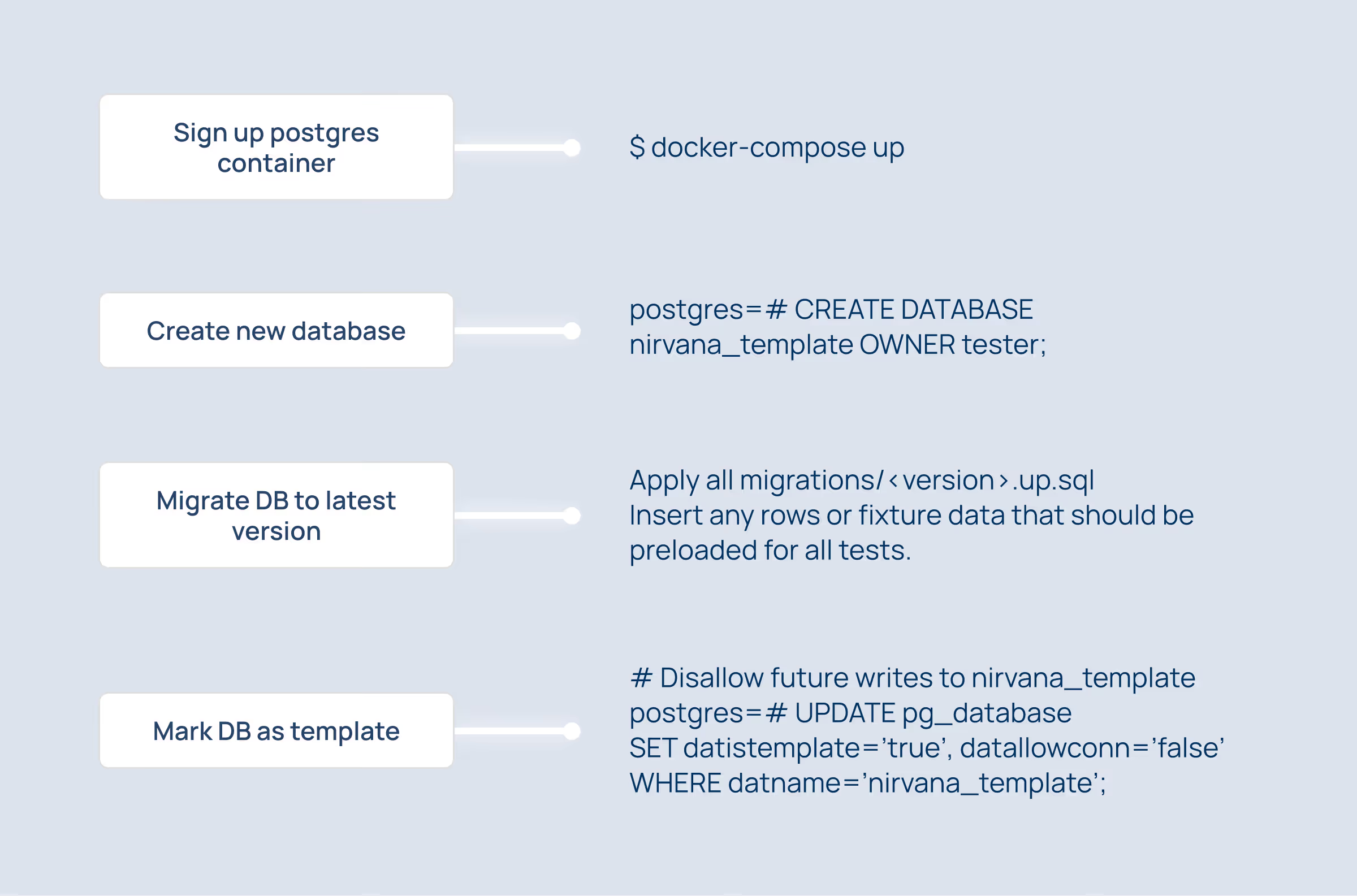
1. Create a fully migrated template database that is ready to be cloned
This template database should be fully migrated to the latest DB schema for the branch being tested. This may include experimental or dangerous schema modifications; if you make a mistake, simply blow away the container and start over.
See the diagram below.
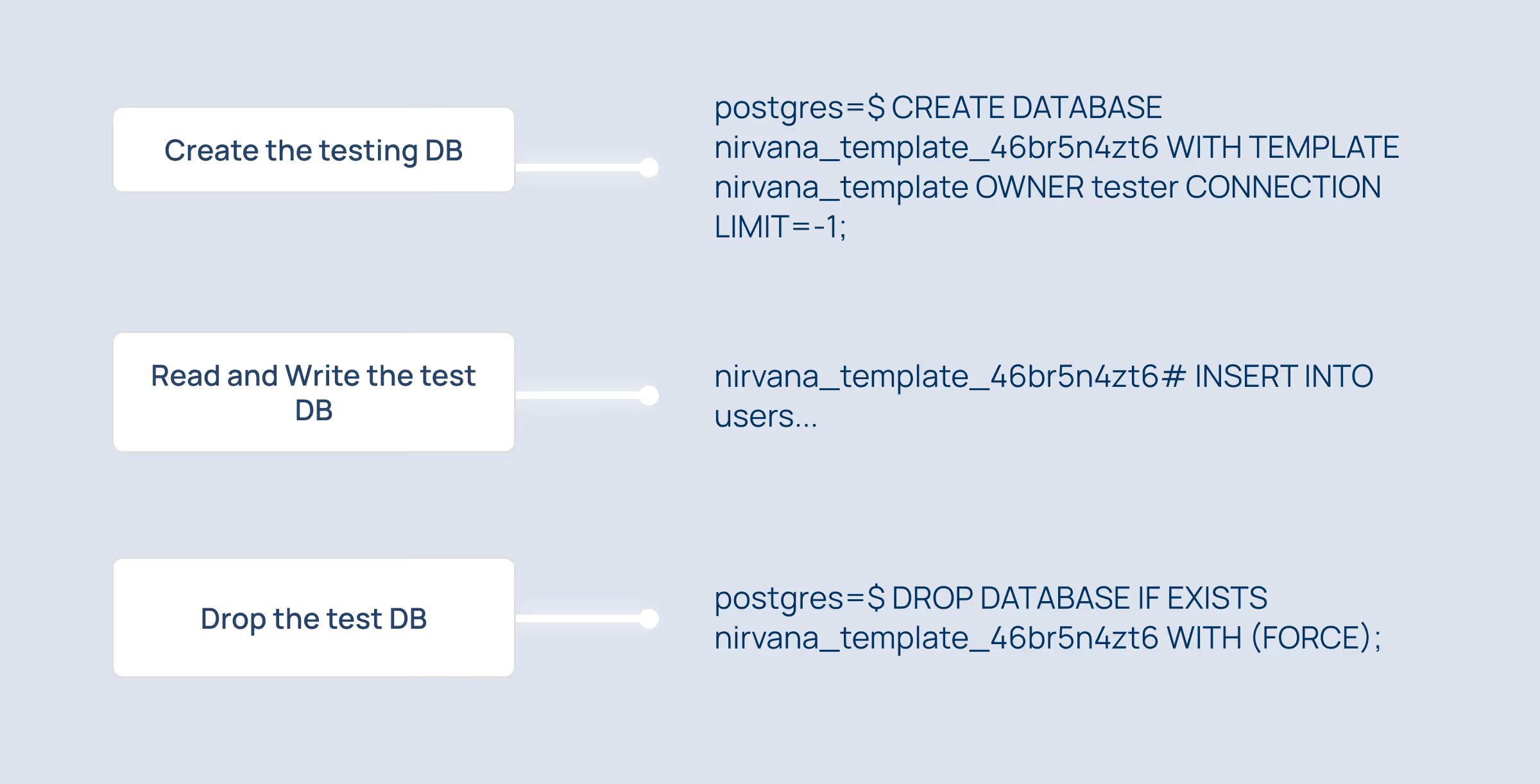
2. For each unit test, clone a new transient database from the template
Each unit test spins up its isolated database within the PostgreSQL container. This database is a complete copy of the template nirvana_template and may be freely modified and queried. The test may drop tables, insert data, query rows, and execute transactions completely isolated from all other concurrently running tests.
Benchmarks
The latency for cloning a new database from template is proportional to the size of the template schema. This size can be found using:
SELECT pg_size_pretty( pg_database_size('nirvana_template'))Our nirvana_template database is roughly ~14MB in size, and creating a new database from this template takes ~40ms per test.
This latency can be amortized to some degree by running tests concurrently, but it is reasonable to expect a minor performance hit compared with in-memory mocks. However, we’ve found that the many benefits of executing tests directly against PostgreSQL far outweigh the costs.
Additional Tips and Tricks
Max connections limit
If you have many unit tests running concurrently, and each unit test has several connections open to several databases, it is possible to exceed the default max_connections limit of 100. There are two approaches to solving this problem, which will largely depend on your environment and circumstances:
- Increasing the postgresql.conf
max_connectionsproperty (along withshared_buffersandmax_wal_size). - Use a connection pool such as PgBouncer or Pgpool.
We spin up a GitHub PostgreSQL service container in our CI workflow for unit testing, and have each unit test create copies of the template databases as needed. View more tips for optimizing the DB for a large number of concurrent connections here.
“Source database is being accessed by other users”
Before PostgreSQL can clone a template database, it needs to ensure that there are no other potential writers in the DB. It does this by taking a conservative approach and ensuring that there are no active connections to the template DB. If you attempt to clone a database that has active connections (even if those connections are just other CREATE DB WITH TEMPLATE calls), you will receive the error:
source database “nirvana_template” is being accessed by other users
This means that we either need to ensure that there are no connections to the DB at all, or we need to set datistemplate=‘true’ and datallowconn=‘false’ for the database.
If you need to drop the template database, remember to first set datistemplate=false; otherwise the template database is read-only.
Simplifying database provisioning with dependency injection
What makes this whole process even easier is that we use an application framework called fx to inject all of our dependencies, so tests themselves do not need to know anything about template databases or PostgreSQL containers. Instead, tests ask for dependencies to be provided, and our fxtest infrastructure automatically provides an appropriate *sql.DB connection to the appropriate database instance.
Conclusion
We had fun experimenting with different solutions until we could implement exactly what we wanted. Our unit tests now transparently read and write to fully isolated PostgreSQL databases, without being aware of template databases or testcontainers running behind the scenes. Keep an eye out for a future blog post on how we built out our dependency injection and testing infrastructure around fx.
%201.jpg)